


01 / DIRECT
Directly to your wallet
Receive the cryptocurrency paid to a previously authorized address in your wallet. Control receiving destinations through your configured merchant connection.
KONEBE · PEURO PAY · FOR YOUR BUSINESS
With Peuro Pay, your business can accept different cryptocurrencies and configure direct payments to authorized addresses in your wallet, or choose settlement converted into PEURO. Find the right solution for your business.
PEURO · BTC · ETH · TRX · BNB · LTC · DOGE · SOL
PEURO PAY
One ecosystem supports distinct settlement options based on your authorized merchant connection settings.
01 / DIRECT
Receive the cryptocurrency paid to a previously authorized address in your wallet. Control receiving destinations through your configured merchant connection.
02 / PEURO
Choose settlement in PEURO after payment verification, subject to applicable operational fees and limits.
Direct receipt does not involve conversion. Availability, assets and networks depend on merchant connection settings.
PEURO PAY · KONEBE
From mobile to e-commerce, find an experience designed around how you sell.
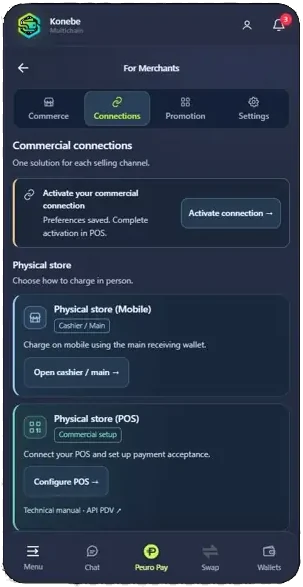
Mobile lets staff charge using Cashier/Main; POS integrates your in-store register.
Use the direct API, Checkout 1.0 when your store picks the asset, or Checkout 2.0 when the buyer picks it.
Checkout 3.0 embeds an HTML widget without building your own payments backend.
PEURO PAY · KONEBE
See how the checkout experiences differ without having to read the API contracts.
| Product | Own backend required? | Who chooses the cryptocurrency? |
|---|---|---|
| API for online stores | Yes | Store system |
| KONEBE Hosted Checkout 1.0 | Yes | Store system |
| KONEBE Smart Checkout 2.0 | Yes | Buyer |
| KONEBE Easy Website Checkout 3.0 | No | Visitor |
Technical basis: official KONEBE V2.35 manuals. Public product information; operations require an active merchant connection and authorized environment.
Set up authorized assets, receiving destinations and settlement mode in Konebe Wallet.
Use the cashier, link, QR or checkout for your chosen integration.
Track blockchain payment and release only after a legitimate financial paid status.
Configure the merchant connection and approved assets in Wallet.
Create a charge or enable the relevant hosted checkout experience.
Present the official link, QR or HTML widget to the customer.
The customer pays with the shown cryptocurrency and network.
The backend verifies blockchain confirmations and financial status.
Only a legitimate paid state authorizes automatic order fulfilment.
Technical details on payment assets, pricing currencies, conversion limits and operational controls.
Documented assets, subject to activation: PEURO, BTC, ETH, TRX, BNB, LTC, DOGE and SOL. Commercial pricing currencies: BRL, EUR, USD or PEUR. Direct receipt sends native crypto to authorized addresses. Converted receipt settles into PEURO after verification, minus the configured fee.
Converted settlement has a minimum of 1 and configurable upper limit of up to 10,000 PEURO equivalent per charge. This reserve commercial cap does not apply to direct receipt, which remains subject to technical and network rules. Fees follow the operator configuration.
PEURO PAY · KONEBE
Four V2.35 guides in English for integrators, software companies and merchants.
In 1.0 the store selects the asset through the POS API; in 2.0 the buyer selects it via the Checkout API; in 3.0 the merchant embeds an HTML widget powered by the Checkout API.
Direct API integration, Checkout 1.0 and Checkout 2.0 need a merchant backend. Checkout 3.0 is designed for sites without their own backend, but the merchant still configures a connection in Wallet.
PEURO, BTC, ETH, TRX, BNB, LTC, DOGE and SOL, subject to the assets enabled on the merchant connection.
Yes, through the direct mode and pre-approved addresses. Converted settlement into PEURO is also documented, with its own fees and limits.
Only after the authorized integration verifies the legitimate paid status. A QR, TXID or HTTP 200 is insufficient.
Yes. The POS API and Checkouts 1.0, 2.0 and 3.0 have official V2.35 PDFs in Portuguese, English and Spanish. This page links to the English editions.
Discover endpoints, authentication, sessions, widgets and verification rules on the technical page.
Technical basis: official KONEBE V2.35 manuals. Public product information; operations require an active merchant connection and authorized environment.