Skip to content
KONEBEWallet & Web3

KONEBE · PEURO PAY · PAYMENT TECHNOLOGY

Peuro Pay.Payment technology built for growth.

Multicurrency merchant payment infrastructure for in-person and online sales. Two APIs, three checkout experiences and integration with Konebe Wallet.

Two merchant APIsThree checkout modelsMulticurrency receipt

PEURO · BTC · ETH · TRX · BNB · LTC · DOGE · SOL

Peuro Pay merchant integration screen in Konebe Wallet
PEURO PAYKonebe Wallet + Peuro Pay technology

PEURO PAY · KONEBE

Two APIs. More ways to sell.

A clear foundation: one API for POS and direct payment requests; another for checkout sessions and widgets. Every experience uses the appropriate contract.

01 / POS API

POS API · Traditional integration

Your store creates a charge and tracks its status.

POST /api/merchant-pdv

POST /api/merchant-pdv · create/status. Your server selects the cryptocurrency, creates the payment and checks its status. Used by in-store POS, online store APIs and Checkout 1.0.
02 / Checkout API

Checkout API · Sessions and widgets

The checkout adapts the payment experience for buyers.

POST /api/merchant-checkout

POST /api/merchant-checkout · session-create/session-status and dedicated widget actions. Checkout 2.0 offers buyer asset selection; Checkout 3.0 uses an authorized HTML widget.

PEURO PAY · KONEBE

A solution for every sales channel

Six experiences for distinct business needs — without confusing checkout products with separate APIs.

Physical stores

Cashier / Main

Physical store — Mobile

Charge on mobile; an authorized main wallet receives.

See how it works

Charge from a cashier phone while the authorized main wallet receives funds in the relevant flow. This is not a separate API.

POS

Physical store — POS

Connect your physical POS and track sales status.

See how it works

Connect your till system to the POS API to create charges and check settlement status. Keep the credential server-side.

Online stores and websites

For developers

API for online stores

Connect your e-commerce backend directly.

See how it works

Your backend picks the asset, creates a charge through the POS API and displays a payment link or QR to the buyer.

Checkout 1.0

KONEBE Hosted Checkout 1.0

Buyers pay on Konebe checkout; the store picks the asset.

See how it works

Your system chooses the asset and creates a charge; the customer pays in Konebe hosted checkout. Uses the POS API.

Checkout 2.0

KONEBE Smart Checkout 2.0

Buyers select the cryptocurrency in hosted checkout.

See how it works

Your backend sends the commercial amount and currency. The customer chooses an allowed asset in Konebe checkout. Uses the Checkout API.

Checkout 3.0

KONEBE Easy Website Checkout 3.0

Embed HTML in your site without building a backend.

See how it works

Embed HTML with a public widget ID on a simple website. Supports configurable open-amount donations or fixed-price payments. Uses the Checkout API.

Technology that supports secure operations

Protected credentials, authorized destinations and verified payment status, with full details available to integrators.

Verified payments and security

The merchant connection defines approved assets and destinations. Keep the PDV Key only in a protected server-side component; the widget uses a public identifier only. Payment links and QR codes must contain no seeds or private keys. POS API payment QR codes must use order.paymentUrl exclusively.

Read technical details and security rules

Opening checkout, scanning a QR, receiving HTTP 200 or sharing a TXID is not proof of payment. The merchant server must verify the legitimate paid state before automatically fulfilling an order.

Receiving modes, currencies and limits

Documented assets, subject to activation: PEURO, BTC, ETH, TRX, BNB, LTC, DOGE and SOL. Commercial pricing currencies: BRL, EUR, USD or PEUR. Direct receipt sends native crypto to authorized addresses. Converted receipt settles into PEURO after verification, minus the configured fee.

Read technical details and security rules

Converted settlement has a minimum of 1 and configurable upper limit of up to 10,000 PEURO equivalent per charge. This reserve commercial cap does not apply to direct receipt, which remains subject to technical and network rules. Fees follow the operator configuration.

PEURO PAY · KONEBE

Explore Peuro Pay in the Wallet

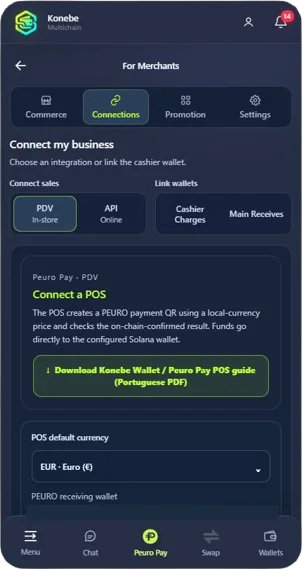
Merchant configuration, POS connection and asset selection in the existing interface.

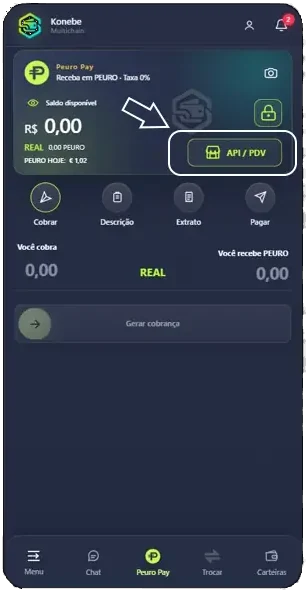
Peuro Pay API/POS shortcut inside Konebe Wallet
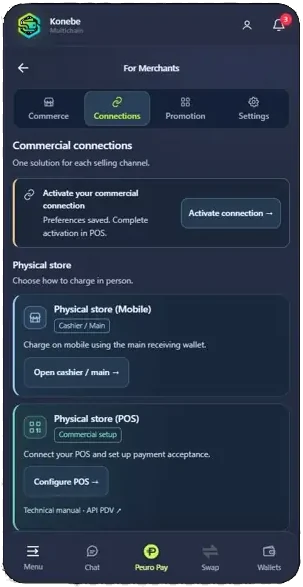
Merchant Connections with Mobile and POS options
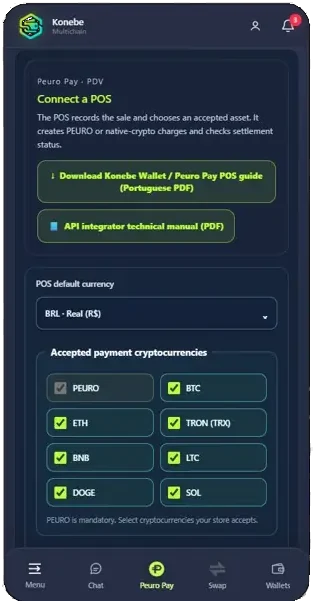
Accepted cryptocurrencies configured for the POS connection

Reference screens from the Wallet merchant area. Interface labels may vary by language and account configuration.

Frequently asked questions

How do Checkouts 1.0, 2.0 and 3.0 differ?

In 1.0 the store selects the asset through the POS API; in 2.0 the buyer selects it via the Checkout API; in 3.0 the merchant embeds an HTML widget powered by the Checkout API.

Do I need my own backend?

Direct API integration, Checkout 1.0 and Checkout 2.0 need a merchant backend. Checkout 3.0 is designed for sites without their own backend, but the merchant still configures a connection in Wallet.

Which payment assets are documented?

PEURO, BTC, ETH, TRX, BNB, LTC, DOGE and SOL, subject to the assets enabled on the merchant connection.

Can I receive native cryptocurrency?

Yes, through the direct mode and pre-approved addresses. Converted settlement into PEURO is also documented, with its own fees and limits.

When can my store mark an order paid?

Only after the authorized integration verifies the legitimate paid status. A QR, TXID or HTTP 200 is insufficient.

Are the manuals localized?

Yes. The POS API and Checkouts 1.0, 2.0 and 3.0 have official V2.35 PDFs in Portuguese, English and Spanish. This page links to the English editions.

Find the right option for your store

Compare sales channels, backend requirements and who selects the cryptocurrency.

Technical basis: official KONEBE V2.35 manuals. Public product information; operations require an active merchant connection and authorized environment.