


No Konebe login
The standalone file does not require access to Private Moovie.
PRIVATE MOOVIE · ETHEREUM MAINNET
Freeze Coins lets you schedule an ETH time lock through a smart contract on Ethereum Mainnet. When creating it, you choose the amount and release date, then protect the future withdrawal using a Freeze Key and Security PIN.
ETH time lock · Dedicated authorization · Independent recovery
HOW IT WORKS
You choose the release date when creating the Freeze. Once confirmed on-chain, the ETH is subject to the contract conditions.
Select how much ETH to lock and verify the Ethereum wallet.
Schedule the date and time at which withdrawal becomes eligible.
Review the details and confirm the contract creation on Ethereum Mainnet.
After the deadline, authorize the destination with your Freeze credentials.
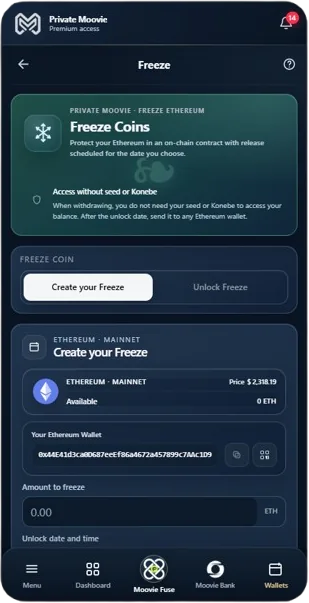
CREATION
The creation interface identifies Ethereum Mainnet, the source wallet, its balance and the amount to lock. During setup, the user chooses the release date and prepares the Freeze Key and PIN. After reviewing the details, the transaction is confirmed on-chain.
ON-CHAIN TIME LOCK
Freeze V2 stores the chosen release date in the contract and does not offer an administrative early-unlock function. Reaching that date does not automatically send ETH: a valid withdrawal must still be authorized and confirmed on Ethereum Mainnet.
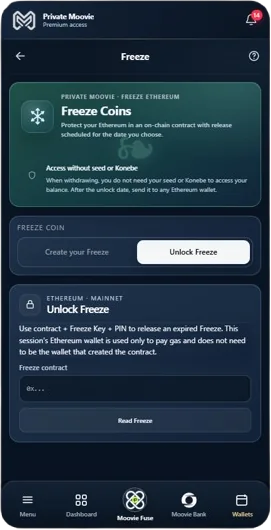
UNLOCK
Private Moovie Unlock V2 uses the active ETH wallet in the session to pay withdrawal gas. Read the V2 contract, check its balance and release date, enter Freeze Key and PIN, and choose a destination. All ETH held for withdrawal goes to the destination; transaction gas is charged to the broadcasting wallet.
INDEPENDENT RECOVERY
Freeze V2 contract authorization uses its own Freeze Key and Security PIN, not the account that funded it. The Ethereum wallet broadcasting the withdrawal pays gas; the destination receives the locked ETH. In the standalone HTML, a recovery phrase is needed only to derive the gas-paying wallet — it does not replace the Freeze Key or PIN.
The standalone file does not require access to Private Moovie.
The original depositing wallet seed is not required. Standalone V2 HTML requests the BIP39 phrase of the gas-paying wallet. Prefer a dedicated wallet funded only with enough ETH for gas.
ETH can be withdrawn to a different Ethereum wallet.
STANDALONE TOOL · FREEZE V2.0
A self-contained HTML file for Freeze V2 contracts on Ethereum Mainnet. Read contract status, locally verify Freeze Key and PIN, choose the ETH receiving address, and use a separate wallet to pay network gas. It needs neither Konebe login nor Web3 extension, but requires HTTPS access to an Ethereum RPC for reads and broadcasting.
V2 HTML · PT-BR / EN / ES · no external scripts
Download V2 recovery tool ↓V2 recovery instructions →265033b1b8f5a163b77cd9edd61ca222138ac3797814de3cf4315a0a22f74e7dVerify the downloaded file against this SHA-256 checksum. The tool checks Freeze V2 contracts on Ethereum Mainnet through VERSION() = 2.
The BIP39 phrase entered into the HTML can sign transactions for the gas-paying wallet. Use a trusted device and preferably a dedicated low-balance wallet. Never send your seed, Freeze Key or PIN to support or others. The destination gets the locked ETH; the payer covers gas only.
This tool is intended for Freeze V2. Verify the source and SHA-256 checksum before entering sensitive data.
RECOVERY INFORMATION
These recovery materials are specific to your Freeze. Without a matching Freeze Key and PIN, the tool cannot reconstruct the authorization.
Locates your Freeze on Ethereum.
32-character, case-sensitive authorization secret.
10-digit PIN associated with the Freeze credential.
Local copy of the independent tool for contract lookup and withdrawal preparation.
Without the correct Freeze Key and Security PIN, the tool cannot recreate a matching Freeze V2 authorization. There is no administrative early release or credential reset. The time lock does not accrue interest.
Each contract records conditions such as unlock time, withdrawal state and balance. Each Freeze has its own address, which can be checked through an Ethereum explorer. The supplied source alone does not establish that every deployed contract has identical bytecode.
FREQUENTLY ASKED QUESTIONS
The supplied implementation uses Ethereum Mainnet to time-lock ETH. Reading and withdrawing require that network.
Yes. The date and time are chosen at creation and become part of the contract conditions once confirmed.
Freeze V2 does not expose an early withdrawal or administrator early-unlock method.
No. A valid authorization and an Ethereum withdrawal transaction are still required.
The original depositing wallet seed is not required. Standalone V2 recovery does require the BIP39 phrase for a DIFFERENT wallet that pays network gas. The Freeze Key and PIN remain mandatory.
No. Standalone V2 HTML needs no Konebe login, Web3 extension or relayer; it does need an Ethereum RPC and a gas-paying wallet.
Yes. The Ethereum destination is bound to the authorization and must be checked before sending.
Freeze V2 has no administrative reset for Freeze Key or PIN. Without matching credentials, the HTML cannot authorize a withdrawal.
The V2 HTML runs locally but needs an Ethereum Mainnet HTTPS RPC to read, simulate, estimate fees and broadcast. It is not fully offline recovery.
The broadcasting Ethereum wallet pays gas with its own ETH. It may differ from both the wallet that created the Freeze and the receiving wallet. All releasable ETH in the V2 contract goes to the destination.
No. The Freeze Coins feature provides a time lock, not automatic interest or staking.
Look up the specific Freeze address on an Ethereum explorer. Confirming deployed bytecode requires examining that exact contract.
Explore Freeze Coins in Private Moovie and keep an independent recovery-tool copy before scheduling a time lock.
The supplied recovery tool has not been validated here against live deployed contracts. Do not test it with real funds before a controlled cryptographic compatibility review.