Skip to content
KONEBEWallet & Web3

KONEBE / SELF-CUSTODY WALLET

Konebe Wallet. Your crypto, your accounts, your control.

A self-custody wallet for organizing Bitcoin, PEURO and other assets across different networks. Create or import wallets, monitor balances, send, receive and access Swap from one application.

Multiple accounts, network selection and transaction review give every move a clear context.

Self-custodyMultichainMultiple accounts
MULTICHAINNetworks and assets
MULTI-WALLETSeparate accounts
PEUROTransfers with receipts
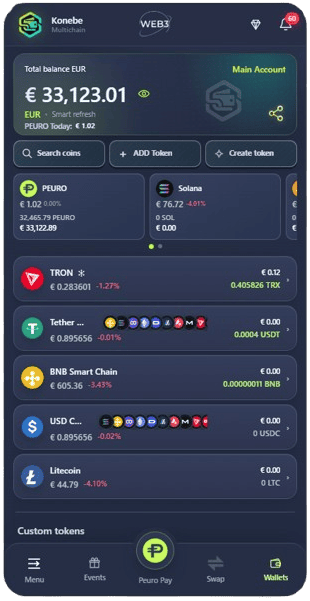
Konebe Wallet dashboard with multiple assets and balances
KONEBE WALLET

KONEBE WALLET TECHNOLOGY

Multichain architecture, self-custody and reviewable transactions.

Konebe Wallet is a multichain cryptocurrency wallet developed by Konebe. It combines independent accounts, network selection, token management and transaction review in one interface.

Multiple networks and wallets

The Wallet displays assets on Bitcoin, Ethereum, Solana, TRON and BNB Chain, along with tokens on supported networks. Every account has its own address; confirm both network and recipient before sending.

See supported assets
Self-custody and local signing

Create or import wallets, recover with a BIP-39 phrase where applicable, and locally authorize self-custody transactions. A PIN controls access to the app; it does not replace the recovery phrase.

Security and privacy

Ecosystem without conflating custody

Swap depends on available routes and quotes. Peuro Pay, PEURO, Moovie Bank and Private Moovie are separate offerings; Wallet self-custody does not automatically apply to them.

Explore products

MULTIPLE ACCOUNTS IN PRACTICE

Each wallet has its own address and transaction context.

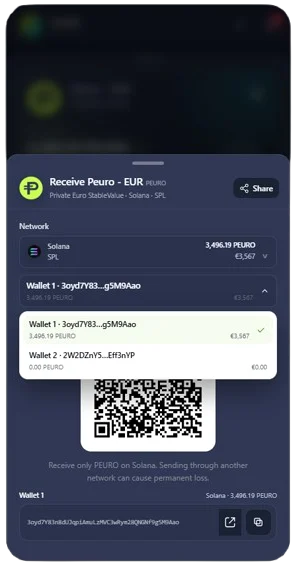
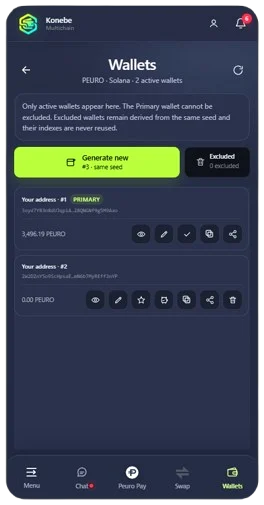
In PEURO account management, Wallet 1 and Wallet 2 have separate balances and controls. Identify the active account without mixing addresses; backups must match each recovery identity.

PEURO wallet address and account management in Konebe Wallet

Actual Wallet screenshot. Balances and prices reflect the captured interface.

PEURO IN ACTION

From destination address to transaction receipt.

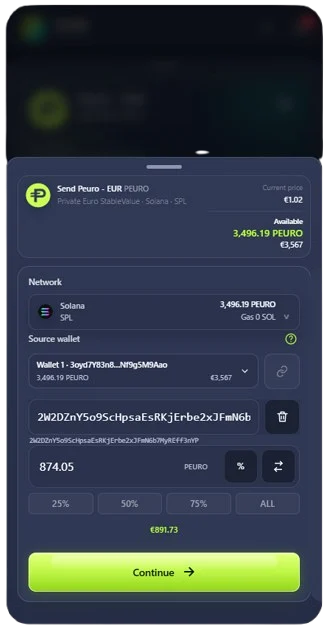
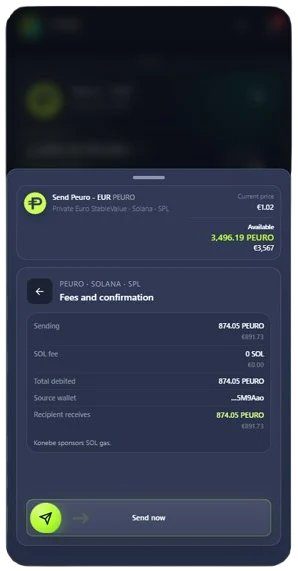
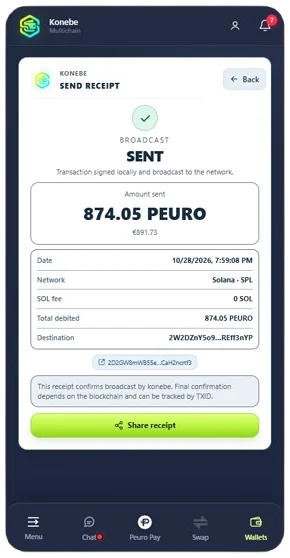
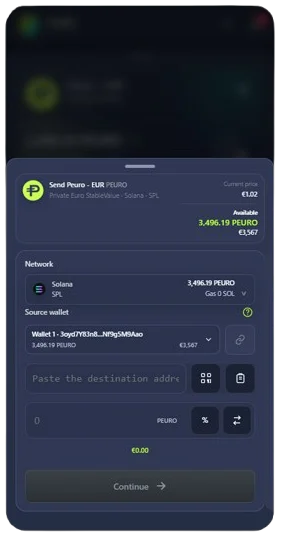
Sending PEURO on Solana brings account selection, recipient, amount and final review into a single flow. Once broadcast, the receipt records the transaction so you can follow network confirmation.

PEURO transfer first step: source account and Solana network
01 / 04

Choose the wallet

Select PEURO on Solana and verify the sending account.

PEURO transfer with destination address and amount entered
02 / 04

Prepare the transfer

Enter the destination address and amount before proceeding.

PEURO sending fee and confirmation screen on Solana
03 / 04

Review the details

Verify recipient, amount debited and any fees before authorizing.

PEURO transaction broadcast receipt
04 / 04

Track the receipt

Check the broadcast record and verify confirmation on-chain.

Actual Wallet screenshot. Balances and prices reflect the captured interface.

MULTICHAIN RECEIVING

The right network. The right wallet.

Choose an asset and its network, select the wallet, then share the matching address or QR code. For USDT and other multichain tokens, the sending and receiving networks must match.

PEURO receiving screen showing QR code and account selection

YOUR ASSET LIST

Keep the assets you use within view.

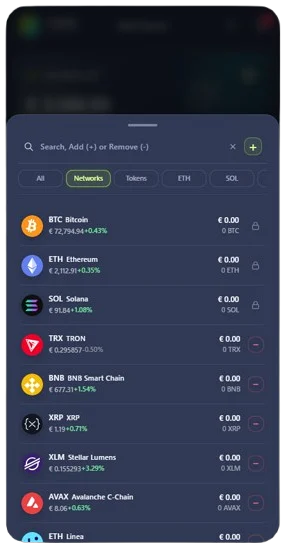
Add or hide assets on your dashboard without confusing visibility with trading availability. Bitcoin, Solana, TRON and tokens are displayed according to Wallet support; Swap routes are checked separately.

Konebe Wallet supported coin and network list
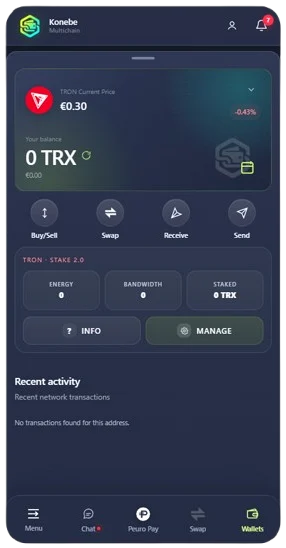
TRON balance with Energy, Bandwidth and TRX resources

TRON IN THE WALLET

Energy, Bandwidth and TRX in one place.

View available resources, TRX balance and network staking controls. Lockup, withdrawal and fee conditions follow the underlying blockchain rules.

SELF-CUSTODY IN PRACTICE

Tools to manage your wallet deliberately.

01

Create, import and recover

Create a wallet or import an existing one through the supported options. Where used, the BIP-39 phrase restores access to associated assets: keep it offline. A PIN protects local access but never replaces the recovery phrase.

02

Independent recovery identities

Manage different wallet identities in one interface. If an account has its own recovery phrase, its backup must be separate as well: one wallet’s seed cannot automatically restore another.

03

Networks and tokens in context

Track Bitcoin, Ethereum, Solana, TRON, BNB Chain and tokens on supported networks. Always verify the destination address and the token’s network standard before receiving or sending.

04

Send, receive and Swap

Share the selected network’s address or QR code, verify the recipient before sending and use the receipt to track broadcast. For Swap, route availability and quoted conditions are presented for review.

05

Web and official distribution

Use the web application, install the PWA on supported platforms or obtain the Windows installer from official downloads. Optional Private Moovie services have separate terms and do not change Wallet self-custody.