


Create on Solana
Start the Konebe Wallet token-creation flow with the Solana network selected.
KONEBE WALLET · SOLANA
Your project, your tokenBring your idea to the Solana blockchain through Konebe Wallet. Discover how to create a new token and manage your assets from one multichain wallet.
Token creation takes place in the Konebe Wallet app, not on this public page. Fees and confirmations appear during the transaction.
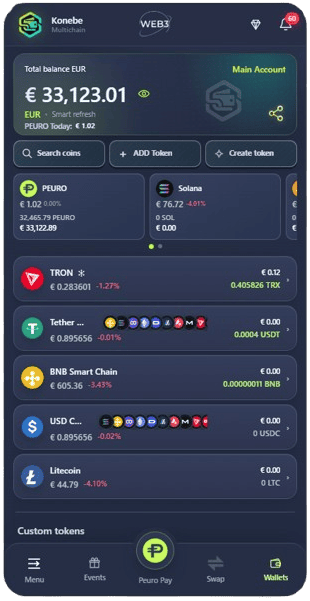 ◎ SOLSolana network✦ KONEBEToken creation
FROM PROJECT TO TOKEN
The Wallet provides a dedicated option to begin creating a new token on Solana. Before confirming, review the fields shown in the app, the active wallet and the applicable costs.
Start the Konebe Wallet token-creation flow with the Solana network selected.
Check token information, the wallet signing the transaction and the fees displayed in the app.
After on-chain confirmation, track your new asset using the wallet features available.
HOW TO START
Open the app and select the Solana account you want to use.
From the assets area, use the token-creation option provided in the Wallet.
Complete the required fields, review costs and confirm the on-chain transaction.
INSIDE THE APP
The network selector shown here is the “Custom token” screen: it adds a token that already exists to your Wallet. To issue a new token, use “Create your token” on the wallet dashboard.
Temporary screenshots supplied for this page. The token-creation interface may look different from the illustration.
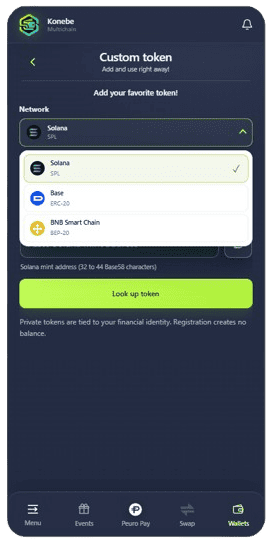
CUSTOM TOKEN
With “Custom token”, you can add an existing asset in a few steps: choose the correct network and enter its mint or contract address. Supported networks for this feature are Solana, Base and BNB Smart Chain.
BEFORE CONFIRMING
Creating a token can involve blockchain fees and platform charges shown in the app. Issuing a new token is not the same as adding a mint or contract to your asset list. Review everything in the Wallet before signing.
FAQ
At this stage, new token creation is available on the Solana network through Konebe Wallet.
Yes. “Custom token” lets you add an existing token by mint or contract address on Solana, Base or BNB Smart Chain.
A mint or contract address identifies an existing token. Creating a new token uses the separate “Create your token” flow in the app.
No. This page explains the feature and links to Konebe Wallet. Signing and submitting transactions happen in the app.
Review any applicable network or platform charges shown by the app before confirming.
KONEBE WALLET
Open your wallet and choose the right action: create a token on Solana or add an existing one.